
Vertex² User Manual · PDF pages 32–33
Web Server – CEC / RS232 Section
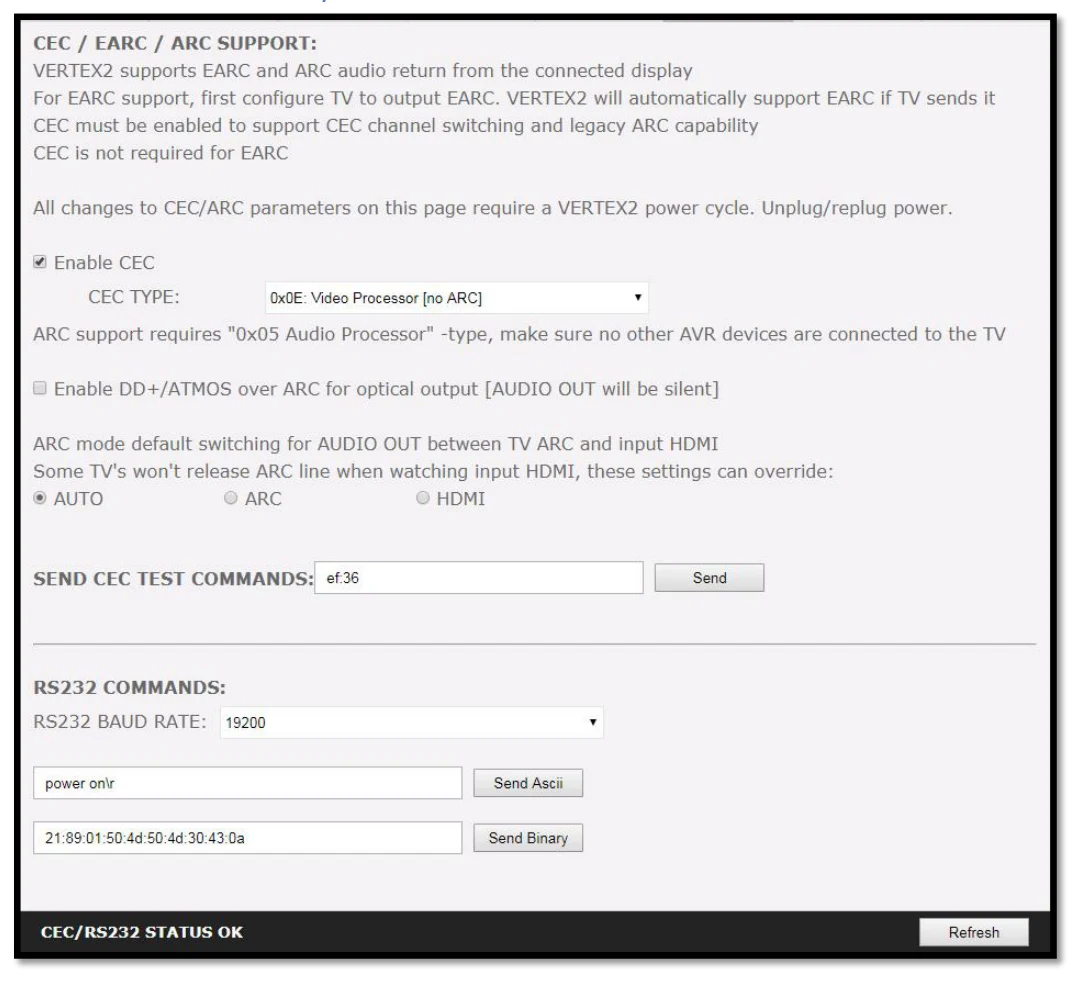
[ENABLE CEC] must be checked in order to apply the selected dropdown options to the Vertex² unit. Once activated it allows Vertex² to answer and process CEC requests and commands and appear on the TV CEC network map. Uncheck it if you do not want Vertex² to answer external CEC requests or process Internal CEC commands. Unchecking will remove Vertex² from the Root(TV) network map but CEC commands for connected sinks or sources will still pass-thru.
[CEC TYPE] Video Processor (Default) is the device type to choose if you have an AVR in your setup and if you want to use that AVR for ARC or CEC.
[CEC TYPE] Audio Processor is the device type to choose if you want Vertex² ARC feature to be ON (Sound from TV ARC to Vertex² HDMI audio out, 5.1 Optical Out or Jack Analog Stereo output.
[Enable DD+/ATMOS ARC] If your AVR is capable of accepting more than Dolby Digital or DTS or if can take 192khz Audio via its optical input, you can use Vertex² to extract DD+ and Atmos from TV embedded streaming APPS and forward it to your AVR via the Vertex² HDMI audio out or optical output. Only a very few AVR on the market can support 192khz via optical in such case, use HDMI audio out to feed DD+/ATMOS to your AVR input.
[AUTO] Default ARC sound extraction option, only use ARC or HDMI if AUTO does not perform well with your TV.
[ARC] Force Audio OUT to output sound from TX0 ARC
[HDMI] Force Audio OUT to output sound from any sources at input.
[SEND CEC TEST COMMAND] Enter the CEC command of your choice in this text field in HEX format. If you are not sure about how to format your command, we recommend you to visit the very well done cec-o-matic website made by Kwikwai.
[RS232 COMMAND] Allow you to test RS232 command to make sure your unit is properly configured and ready to communicate via RS232.
[RS232 BAUD RATE] Set the RS232 link speed (default 19200)
[Send Ascii] Once RS232 command have been entered in Ascii format, use this button to send it out.
[Send Binary] Once RS232 command have been entered in HEX/Binary, use this button to send it out.
[REFRESH] Refresh the current page.
Note: CEC/ARC master is TX0, if you want ARC from the TV; you need to connect your TV ARC capable input to Vertex² HDMI TX0 OUTPUT and set the unit as Audio Processor under Vertex² CEC device type.
Note on eARC: eARC does not rely on CEC, therefor it is not needed to select any CEC options in order to extract up to Dolby Atmos HBR over TrueHD from capable eARC TV. That is always done automatically and forwarded to HDMI audio out of the Vertex² so you can feed any AVR input with it.